
Slack Howto


last modified 2010-01-03 19:17:58
Processing time 0.0079 sec


|
Slack Howto
Version: 1.0
작성자: 이돈현(환골탈태)
![[http]](/imgs/http.png) http://blog.easysw.net http://blog.easysw.net
1.1. Slack 이란 
1.3. Slack 특징 
1.4. Slack subrole 기능 
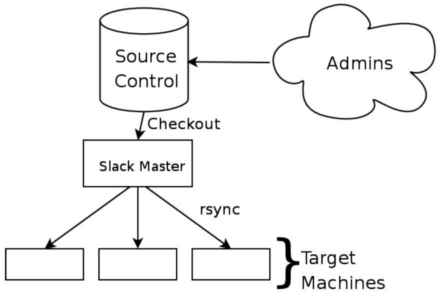
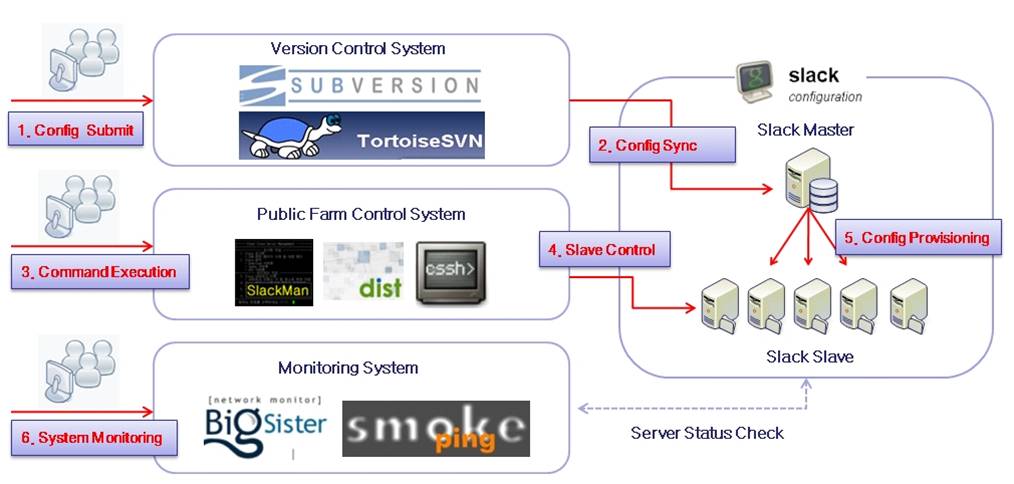
2.1. Slack Master install ¶wget http://slack.googlecode.com/files/slack-0.15.2.tar.gz tar xfzp slack-0.15.2.tar.gz cd slack-0.15.2 make make install ls /etc/slack.conf 2.2. Slack Master rsyncd.conf ¶cat > /etc/rsyncd.conf <<END [slack] path = /data/slack comment; = slack test uid = 1000 gid = 1000 read only = true # 일반계정은 ~/rsyncd.conf 생성, 하단 주석해제 # use chroot = false END [ -f /etc/rsyncd.conf ] && chown root:root /etc/rsyncd.conf [ -f /etc/rsyncd.conf ] && chmod 600 /etc/rsyncd.conf 2.3. Slack Master slack.conf ¶ROLE_LIST=etc/roles.conf # 기본 롤 정의 SOURCE=slack-master::slack # master 주소::rsync 모듈명 CACHE=/var/cache/slack STAGE=/var/lib/slack/stage ROOT=/ BACKUP_DIR=/var/lib/slack/backups 2.4. Slack Master roles.conf ¶# /data/slack/etc/roles.conf # 적용 할 호스트 명 : 기본 적용 role name web1.sfo.example.com: webserver web2.sfo.example.com: webserver web1.hyd.example.com: webserver.hyd web1.hyd.example.com: webserver.hyd 2.5. Slack Master 디렉토리 구조 
/data/slack/roles/
	|-- etc
	|   `-- roles.conf
	`-- roles
	    `-- download
	       |-- files.configsync
	       |   |-- etc
	       |   |   `-- sysctl.conf
	       |   |-- root
	       |   |   |-- dot.bashrc
	       |   |   `-- dot.vimrc
               |-- files.install
               `-- scripts
                   |-- functions
                   |-- postinstall
                   `-- preinstall
2.6. Slack Slave 설정 
61.110.xxx.xxx slack-master
wget http://slack.googlecode.com/files/slack-0.15.2.tar.gz
tar xfzp slack-0.15.2.tar.gz
cd slack-0.15.2
make
make install
slack download.configsync download.daemonrestart 2.7. Slack 실행순서 
# 해당 role의 file, scripts를 로컬로 동기화
    slack: installing roles: download.configsync
    slack: sync download.configsync
    slack: stage files download.configsync
    slack: stage scripts download.configsync
# scripts에서 preinstall, fixfiles 실행
    slack: preinstall download.configsync
    slack: fixfiles download.configsync
# 백업 디렉토리 생성
# files 적용
    slack: install download.configsync
# scripts에서 postinstall 실행
    slack: postinstall download.configsync
3.1. 시연내용 
4. Being Happy 
5. 참조사이트 
|
   
|
last modified 2010-01-03 19:17:58
Processing time 0.0079 sec