
Emacs Color Theme


last modified 2008-07-20 17:40:26
Processing time 0.0046 sec


Emacs 색상 테마 ¶이 글은 emacs version 22.0을 기준으로, emacs의 테마(theme)로 지정된, 색상을 손쉽게 바꿀 수 있는 패키지인
![[http]](/imgs/http.png) ColorTheme을 소개합니다. 이 패키지는 다양한 색상 조합을 미리 등록해 놓고 있기 때문에 (수십여개 테마 존재), 좀 더 풍요롭게? 텍스트 편집을 할 수 있습니다. 참고로 아주 간단히 만든 테마 설정인 EmacsChangeThemes도 읽어보기 바랍니다. ColorTheme을 소개합니다. 이 패키지는 다양한 색상 조합을 미리 등록해 놓고 있기 때문에 (수십여개 테마 존재), 좀 더 풍요롭게? 텍스트 편집을 할 수 있습니다. 참고로 아주 간단히 만든 테마 설정인 EmacsChangeThemes도 읽어보기 바랍니다.
설치하는 방법은 먼저
여기에 가셔서 파일을 설치하면 됩니다. 설치 방법은 EmacsInstallScript을 참고하시기 바랍니다.
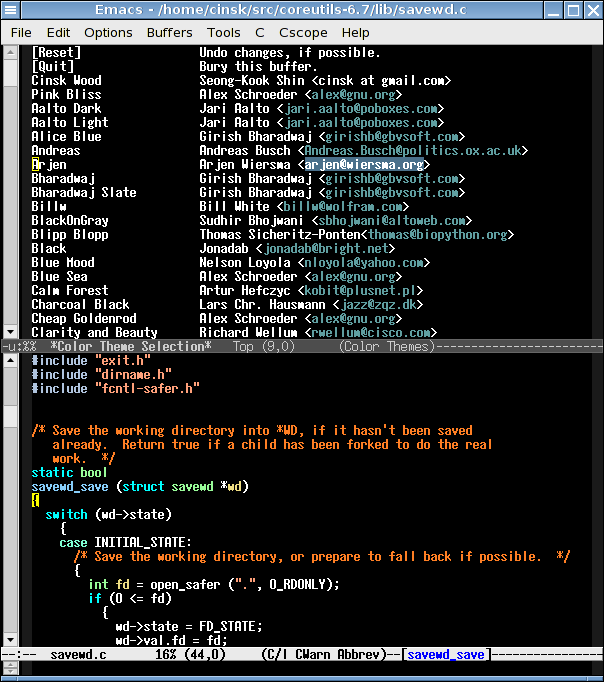 [PNG image (30.71 KB)] 모든 테마는 해당하는 elisp 함수가 있습니다. XXX 테마의 함수 이름은 color-theme-xxx 형태입니다. 예를 들어 Arjen 테마를 emacs가 시작할 때 실행하고 싶다면, .emacs 파일에 다음과 같이 써 줍니다:
(require 'color-theme)
(color-theme-arjen) 만약 랜덤으로 테마를 바꾸고 싶다면 다음 함수를 만들어 둡니다:
(defun select-random-color-theme ()
"Select random color theme" (interactive) (funcall (car (nth (random (length color-themes)) color-themes)))) ;;; Control F1 will change theme randomly. (global-set-key [(control f1)] 'select-random-color-theme) 그리고 C-<F1>을 누르면 원할때, 랜덤으로 테마를 바꿀 수 있습니다.
만약, 사용자가 make-frame이나 new-frame 함수로, 새로 frame을 만들때마다 테마를 랜덤으로 지정하고 싶다면, 위 코드를 포함한 상태로 아래 코드를 더 추가합니다:
(defun set-frame-color-theme (frame)
(select-frame frame) (select-random-color-theme)) (add-hook 'after-make-frame-functrions 'set-frame-color-theme) 그리고 나서 M-x new-frame을 실행하면, 실행할 때마다 랜덤 테마가 적용되는 것을 확인할 수 있습니다.
Q. 제일 위에 있는 스샷 이맥스 글꼴이 어떻게 되나요? 저거 ttf글꼴인건가요? -- oppor
|
You have a deep appreciation of the arts and music.    
|
.png "B)") --
--
last modified 2008-07-20 17:40:26
Processing time 0.0046 sec